
Custom Signals
Users can create their own custom signal types (Protocol Analyzers, Decoders, or Formatters), using our free Plug-in Developers' Kit (PDK.)
Fully Integrated
Plug-ins are fully integrated into the DigiView application.
- All searches, measurements, configuration editors, snaps, scrolls, lists, waveform views, plotting, auto-searches, exporting, printing, etc work in exactly the same way as built-in signals.
- All displays and configuration options use the user-defined signal, channel-select, and field names.
- In fact, the internal signals use the same framework as the plug-ins, ensuring equal functionality.
- All of this functionality is inherited, requiring NO user code.
Simple to Implement
Plug-ins can be very easy to create. They basically have to provide 3 things:
- A routine to return a list of the configuration items to be shown in the signal editor.
- A routine the framework can call to update the current signal configuration settings.
- A routine that accepts a stream of data-change events and generates a stream of formatting records.
The PDK download includes a simple, but functional plug-in written in 24 lines of code.
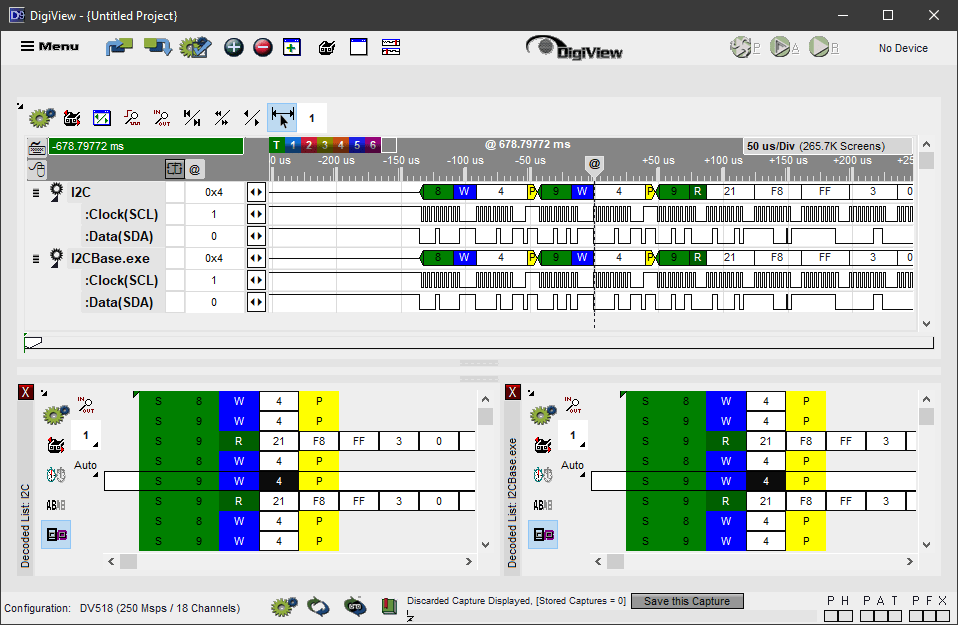
The top waveforms and left table are using the built-in I2C Protocol Analyzer. The lower waveforms and right table are using a Plug-in. Both signals have been configured to look at the same channels. Notice that the DigiView app treats them the same. In this case, the plug-in duplicates the built-in functionality. In actual practice, the plugin would extend or modify the functionality or deal with a completely custom protocol.
Versatile
Plug-ins can operate at different levels, providing many different uses.
- Modify existing Protocol Formatting
- Extend existing Protocol with additional parameters or control signals
- Add higher Protocol Layers to existing Protocols
- Add entirely new Protocols
- Analyze the data contents and/or timing
- Control DigiView's run-time behavior
Copyright © 2025 TechTools. • TechTools, DigiView, ACM, ClearView, CVASM, EconoROM, FlexROM, QuickLoader, QuickWriter, TDE and UniROM are trademarks of TechTools, Rowlett, Texas